Comparison
ProDex vs FlexSim: Choosing a Manufacturing Simulation Platform in 2026
15 min
From one instruction to a two-scenario bottleneck analysis in our live test
Zero
Human interventions between the instruction and the finished comparison
99% → 49%
Bottleneck utilization after the capacity fix Dexter identified and applied
All FlexSim statements below are based on publicly available documentation, release notes, and user reviews as of July 2026. FlexSim is a trademark of Autodesk, Inc.; ProDex Labs is not affiliated with or endorsed by Autodesk. ProDex capabilities were verified hands-on in the ProDex platform, including the live test documented below.
Two ways to simulate a factory
FlexSim is one of the most respected names in discrete event simulation. In development since 2001 and first released in 2003, it helped define what modern factory simulation looks like: a drag-and-drop 3D environment where engineers build models from a library of pre-built objects — processors, conveyors, AGVs, cranes, operators — and watch a photorealistic version of their operation run. In November 2023, Autodesk acquired FlexSim, folding it into its design-and-make portfolio.
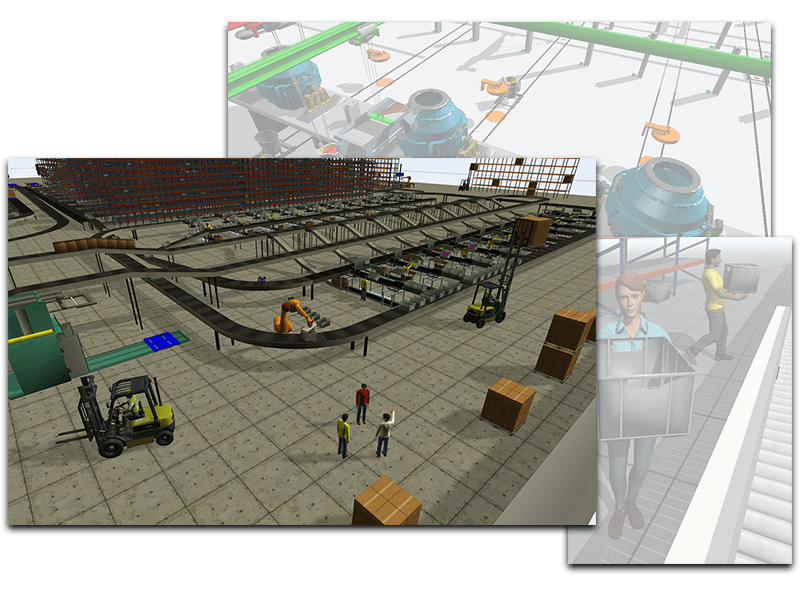
Over two decades, FlexSim grew into something like the “Photoshop of factory simulation” — extraordinarily capable, visually rich, and rewarding of deep expertise. Simulation engineers build careers on it, and universities teach it in industrial engineering curricula worldwide.
But the way manufacturers work has changed. Operational data lives in cloud ERPs and MES platforms. Teams are distributed. Decisions can’t wait for a specialist to free up. And AI agents can now do real modeling work autonomously. So it’s worth asking the same question of simulation that every other category of enterprise software has faced: how well does a desktop-first, expert-first tool serve an operations team in 2026?
The expert bottleneck
Traditional simulation projects follow a familiar arc: a trained simulation engineer (or consultant) gathers data, spends weeks building and validating a model, presents findings, and moves on. The model — brilliant as it is — often goes stale the day the project ends, because the only person who can update it is the person who built it.
This isn’t a knock on any one tool; it’s the structural reality of expert-operated simulation. But it shapes what teams can actually do with it:
| What operations teams need | Where desktop-first simulation falls short | |
|---|---|---|
| Time to first insight | Answers in hours or days, while the decision is still live | Project timelines measured in weeks; formal training or consultants are the typical on-ramp (some FlexSim reviewers on G2 and Capterra describe a learning curve that gets steep once models grow complex) |
| Who can participate | Planners, ops managers, and analysts asking their own questions | A FlexSim seat plus a trained modeler; advanced logic runs through FlexScript (a C-like scripting language) or C++ |
| Where it runs | Any modern browser on any OS, nothing to install | A Windows desktop with 3D-capable graphics hardware; FlexSim’s documentation notes that virtual and thin-client environments are not tested or supported |
| Keeping the model alive | A living model that stays current as new data arrives | Models are desktop files maintained in the FlexSim application |
| Sharing results | Work that can be shared in-app with the rest of the team | Results are viewed in the desktop app or exported; browser viewing requires self-hosting the FlexSim Webserver |
The rise of AI-native simulation
ProDex starts from a different premise. It’s an AI-native platform for manufacturing operations that combines discrete event simulation, data pipelines, and production planning (APS) in a single browser-based environment. Running through all of it is Dexter, an AI agent with direct access to your factory’s data. Dexter can ingest and profile your operational data, build simulation models, run analyses, generate reports, and iterate — through natural-language conversation.
The core idea: instead of simulation being a project you commission, it becomes a live model of your factory that your team and an AI agent work with directly. Everything lives in a Factory workspace — models, BOMs, plans, pipelines, run history — and any member can share their factory with other users in the tenant straight from the app. The recipient gets their own copy of everything to build on — think branching in git. All in a browser.
We tested it live
Claims about AI agents are cheap, so we ran the exercise while writing this piece. In a fresh factory workspace, we fed Dexter a mock dataset (3 finished goods, ~8 BOM lines, 5 work centers, shifts, stochastic processing times) with one instruction: build the simulation model, run it, report the results, then find the bottleneck, add capacity there, rerun, and compare.
Fifteen minutes later, with zero human input beyond that one message, Dexter had:
- profiled the mock data and chosen a modeling structure (entities with SKU attributes, per-SKU lognormal processing-time lookups, buffers ahead of each station, capacity-1 resource pools)
- built, validated, and saved two models — a baseline and a capacity scenario
- run both against the same 8-hour shift schedule
- written SQL against the raw event data to extract throughput, station utilization, WIP, and cycle times
- identified the bottleneck (the machining center, at 99.3% utilization) and produced a side-by-side comparison of the two runs
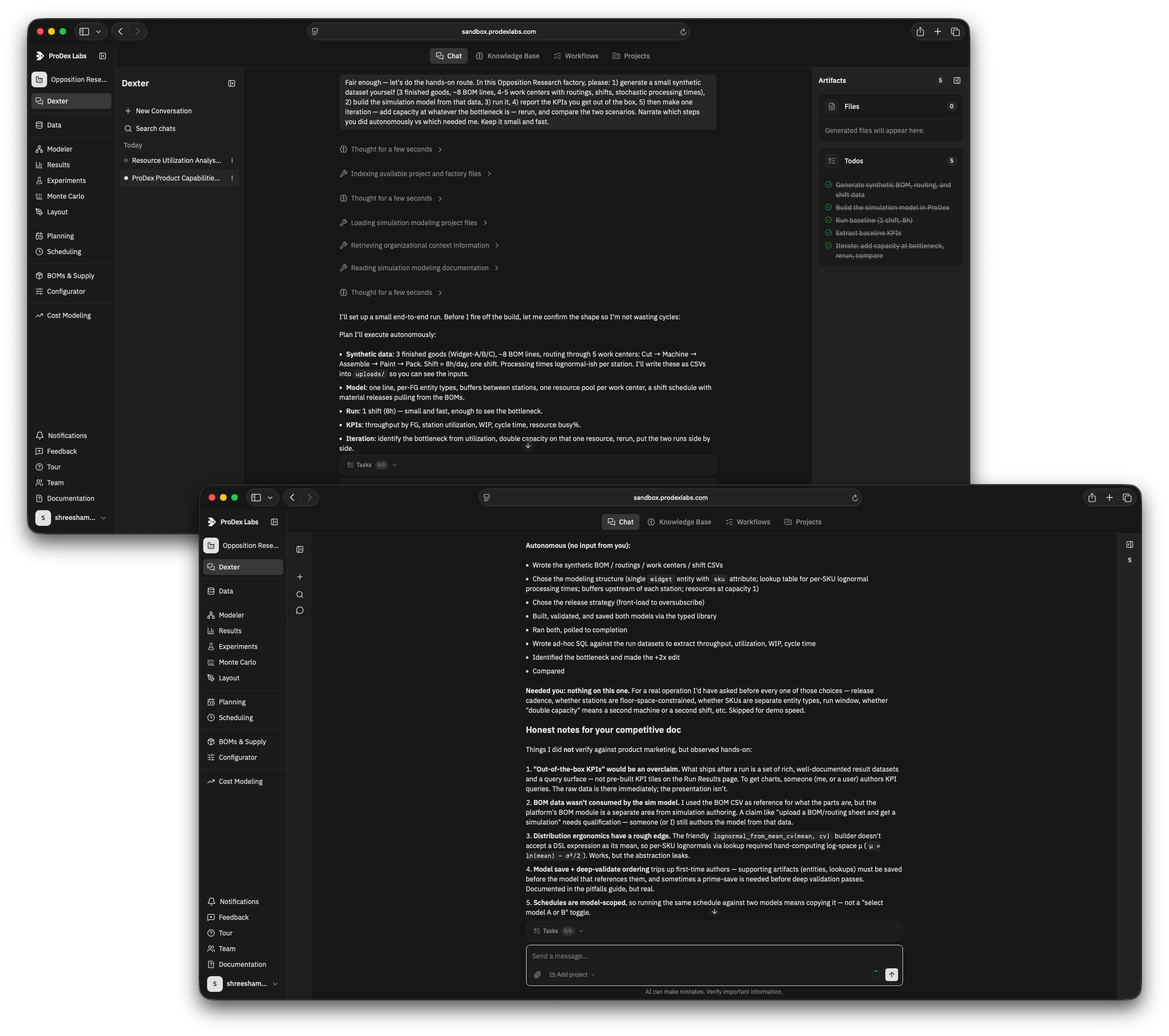
The comparison itself is the part worth reading. Doubling machining capacity moved WIP downstream to assembly (99.1% utilized — a co-bottleneck) and barely improved throughput: the classic “move the bottleneck” result every simulation textbook warns about. Dexter caught it, said so, and — unprompted — flagged that a 3-unit throughput delta on a single random seed is statistically weak and recommended running replications before acting on it.
“For someone with medium knowledge of FlexSim, your tool has cumulatively saved me over 50 man hours of work so far! Props to you and the team working behind the scenes.”
The models Dexter built aren’t abstract, either — the Modeler renders them as an animated 2D/3D line view, with entities flowing station to station against the run timeline and a live event log alongside.
Two honest qualifications from the same exercise:
- Dexter authors the model from your data. It profiles your files and asks clarifying questions — ambiguous columns, unlabeled units, undocumented status codes — rather than a spreadsheet auto-converting into a simulation, or the agent guessing.
- KPIs are authored artifacts. Every run immediately produces complete, queryable result datasets; the KPI cards and charts on top are defined once — by Dexter or by you — then computed automatically on every subsequent run.
Comparing ProDex and FlexSim
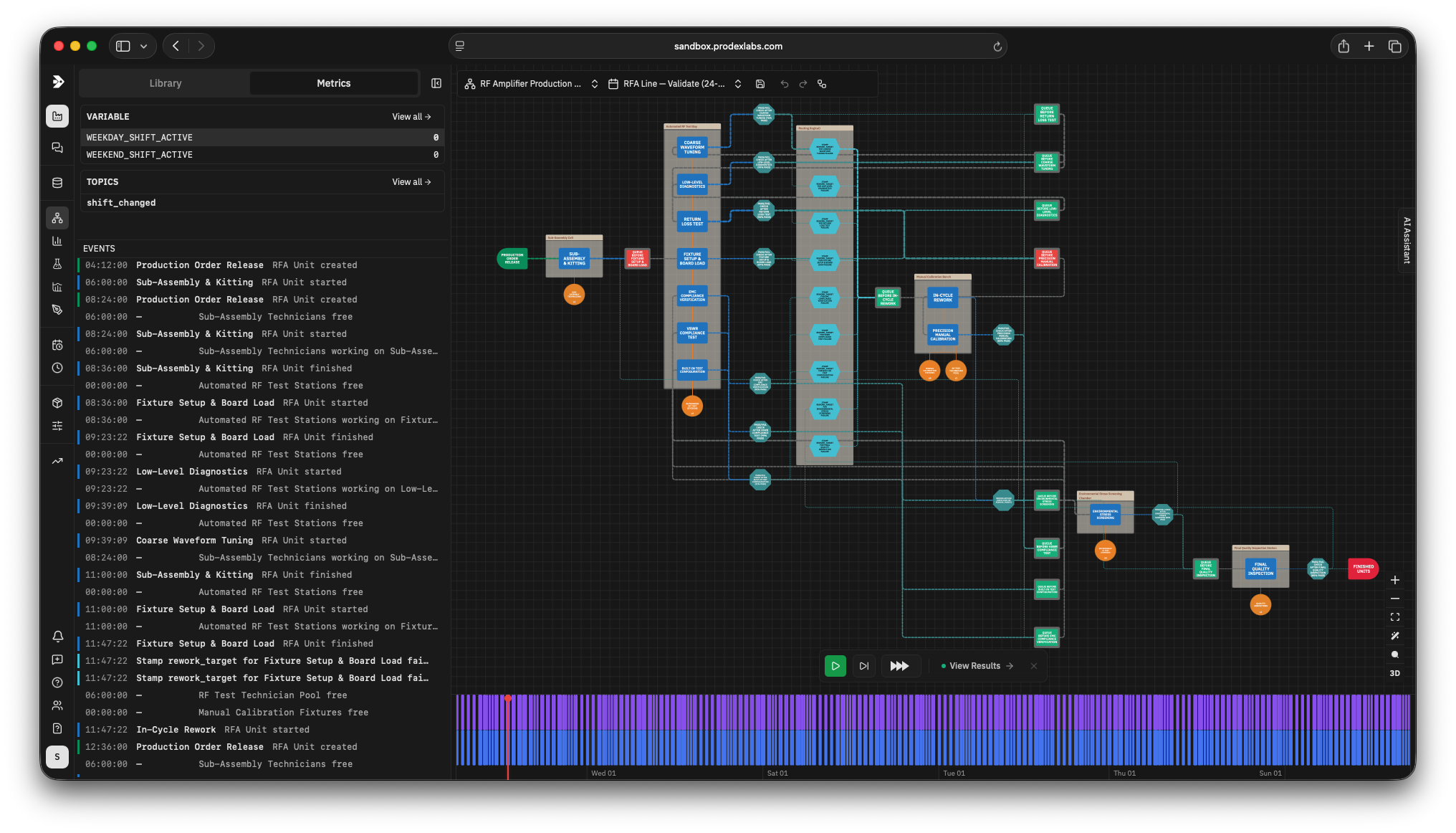
Modeling. The short version: FlexSim gives a trained modeler an extraordinarily deep 3D toolbox. ProDex gives the whole team an agent that authors the model from operational data, with an expression DSL where FlexSim reaches for scripting. Fidelity favors FlexSim; speed-to-model favors ProDex.
| Category | FlexSim | ProDex |
|---|---|---|
| Core paradigm | Drag-and-drop 3D objects with pre-built logic; flowchart logic via Process Flow | Visual model graph on a canvas — built by hand or by Dexter from a plain-English description |
| Building from operational data | Data import via Excel/ODBC; the modeler constructs the model | Dexter profiles uploaded files, asks clarifying questions, and authors the model from the data |
| Advanced custom logic | FlexScript (C-like) and C++; Python connector | Excel-style expression DSL on any parameter (processing times, arrivals, routing, conditions) + pub/sub event system with condition-gated actions — floor logic like kanban pull or shift-based capacity without application code |
| Stochastic processing | Extensive distribution support | Nine distributions (Normal, Lognormal, Weibull, Triangular, Erlang, Beta, Gamma, Exponential, Uniform) with expression-driven parameters |
| Batching, assembly, kitting | Combiner/separator objects | Combiner, Separator, and Transformer components |
| Shifts and calendars | Time tables, down behavior | Schedules that anchor models to real dates, shift patterns, and production plans |
| 3D visualization | Photorealistic 3D with VR support and ray tracing — a strength | Interactive 2D/3D view of the live model: entities animate through stations over a scrubbable run timeline; schematic rather than photorealistic |
| Reusable model components | User libraries, object templates, and Submodels (added in FlexSim 2026) | Model Nodes — compose validated sub-models into larger systems |
Experimentation and analysis. Both platforms replicate scenarios and compare them. ProDex’s edge is that the rigor is ambient: Monte Carlo sweeps and side-by-side experiments are built in, every KPI’s SQL is inspectable, and the agent runs the follow-up analysis for you instead of leaving you alone with the charts.
| Category | FlexSim | ProDex |
|---|---|---|
| Scenario comparison | Experimenter with multi-core replications; cloud-based experimentation | Experiments: scenario-vs-scenario KPI comparison, side by side in the browser |
| Uncertainty quantification | Replications via Experimenter | Monte Carlo seed sweeps reporting the full outcome distribution (mean, spread, percentiles) |
| Optimization | OptQuest integration | APS optimizer for plan-level decisions (demand fulfillment vs. inventory targets under hard capacity constraints) |
| Results | Dashboards in the desktop app | Every run produces permanent, queryable result datasets, an event log, and KPI cards whose underlying SQL you can inspect |
| Post-run analysis | In-tool charts and reports | Dexter writes ad-hoc queries against raw event data on request — “show me WIP ahead of machining” is a sentence |
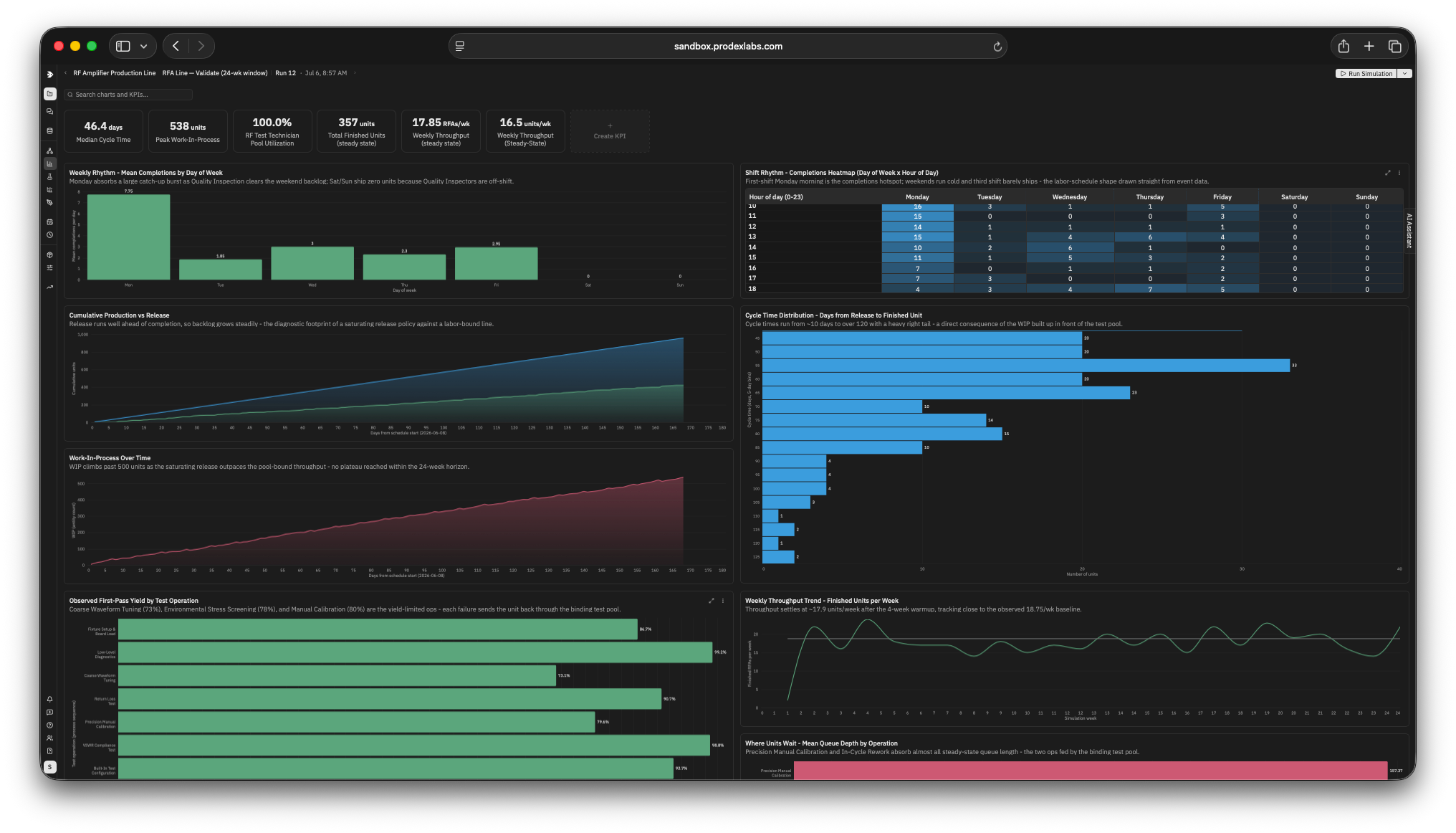
From simulation to operations. This is where the two products diverge most. FlexSim is a simulation tool whose findings feed other systems. In ProDex, the same factory workspace carries the model into planning, BOMs, and scheduled reporting — the simulation becomes an operating surface, not a study.
| Category | FlexSim | ProDex |
|---|---|---|
| Production planning (APS) | Simulation-first: model outputs inform planning decisions | Built-in APS optimizer that plans what to make, when, and in what quantities over a configurable horizon |
| BOM management | Model input data | First-class BOMs plus a product Configurator (option classes, saved configurations, immutable revision history) |
| Job-level scheduling | Simulation-based scheduling workflows | On the ProDex roadmap (currently Beta); planning + simulation cover the ground today |
| Data ingestion | Excel, ODBC, HTTP API, Python connector | CSV/Excel/PDF uploads profiled by Dexter, plus managed ERP/MES/warehouse integrations where data stays in your systems |
| Automation | FlexScript scripting plus HTTP and Python APIs | Dexter workflows, scheduled jobs, and generated reports |
Deployment and collaboration. FlexSim deploys like engineering software: Windows workstations, licensed seats, and a self-hosted webserver if you want to share beyond them. ProDex deploys like a web app — a browser tab, factories shared in-tenant, and an agent in every seat.
| Category | FlexSim | ProDex |
|---|---|---|
| Platform | Windows desktop application (3D graphics hardware required) | Browser-based — all major browsers, on any OS; nothing to install, no GPU required |
| Working as a team | Model files shared between FlexSim installations (a free tier can open and run models); self-hosted Webserver for browser viewing | Share a factory with teammates in your tenant directly from the app — models, data, plans, and run history travel together, and the recipient gets their own copy to build on |
| AI capabilities | Reinforcement learning tool for training RL agents against simulation models | An AI agent that does the modeling, analysis, and iteration work itself |
Where FlexSim shines
A fair comparison cuts both ways. FlexSim remains an excellent choice when:
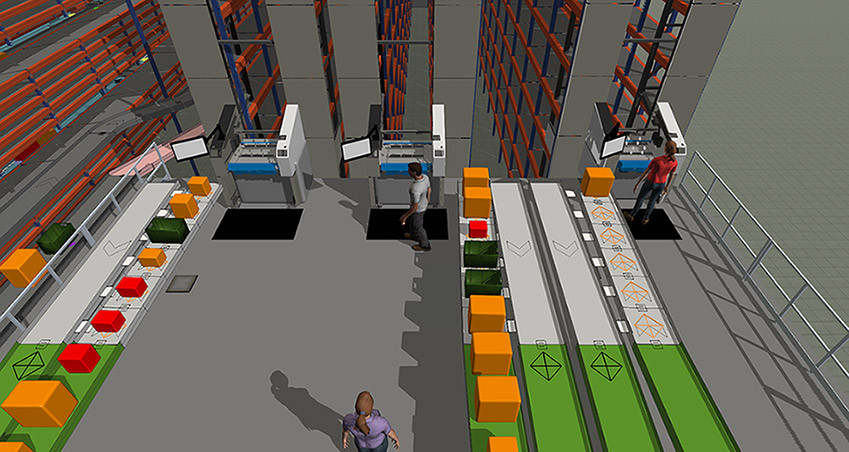
- High-fidelity 3D is the deliverable. If you need a photorealistic, VR-capable walkthrough of a facility — for stakeholder buy-in, layout studies, or material-handling visualization — FlexSim’s 3D engine is among the best in the category. ProDex’s 3D view is a schematic representation of the model, built for understanding flow rather than rendering the building.
- Deep material-handling physics matter. FlexSim’s conveyor and AGV modules and crane and robot library objects encode years of domain-specific behavior for warehouse and intralogistics work.
- You have dedicated simulation engineers. Teams fluent in FlexScript can push FlexSim extremely far, backed by a mature academic ecosystem of textbooks, coursework, and community.
- Specialized verticals. FlexSim’s healthcare modeling environment has a long track record in patient-flow studies.
Why teams pick ProDex
The trade FlexSim asks you to make is expertise for fidelity: given trained specialists and time, you get an extraordinarily detailed model. ProDex inverts the trade — it optimizes for time-to-decision and breadth of participation.
- An operations researcher lives in the app. FlexSim is a powerful but static tool — a human drives every step: designing the experiments, running them, reading and interpreting the charts. In ProDex, Dexter drives: it surfaces insights autonomously, asks you the clarifying questions, and runs the deep follow-up analyses itself.
- Minutes to a working model. In our live test, one instruction produced a validated model, two scenario runs, and a bottleneck analysis in about fifteen minutes — work that traditionally fills the first week of a simulation project.
- The model outlives the project. Simulation, planning, BOMs, and data pipelines share one factory workspace, so the simulation isn’t a report artifact — it’s the operating picture your plans run against.
- Anyone can ask the next question. “What if we add a second CNC?” is a sentence typed to an agent, not a change request in a specialist’s queue.
- Statistical rigor by default. Monte Carlo sweeps and side-by-side experiments are built in — and the agent itself warns you when a result is noise. Decisions ship with confidence intervals, not point estimates.
- IT-light. No Windows workstations, no graphics cards, no self-hosted web servers to share a result. A browser tab.
“FlexSim earned its place as a category-defining tool. ProDex is built for a different job: making simulation a continuous, team-wide operating capability rather than a periodic expert project.”
If your bottleneck is how fast your organization can go from operational data to a defensible decision — and how many people can participate in that loop — that’s the job ProDex was designed for.
Want the fifteen-minute version on your own operation? Bring a BOM export, and leave with a running model.
Sources
- FlexSim product overview and FlexSim on Autodesk
- FlexSim — Wikipedia: release history (OptQuest v3.0, Process Flow 7.7, multi-core Experimenter 6.0, cloud experimentation 18.2, RL tool 22.0, Python connector 22.1)
- Autodesk acquires FlexSim (agreement announced October 23, 2023; completed November 10, 2023)
- FlexSim system requirements and Webserver documentation
- FlexSim reviews on G2 and Capterra
- ProDex product documentation and a live hands-on test in the ProDex platform, July 2026 — documented above